
Labels Merge
A Windows desktop tool that puts two 4x6 shipping labels on one sheet of Letter paper, at exact size, so the barcode still scans.
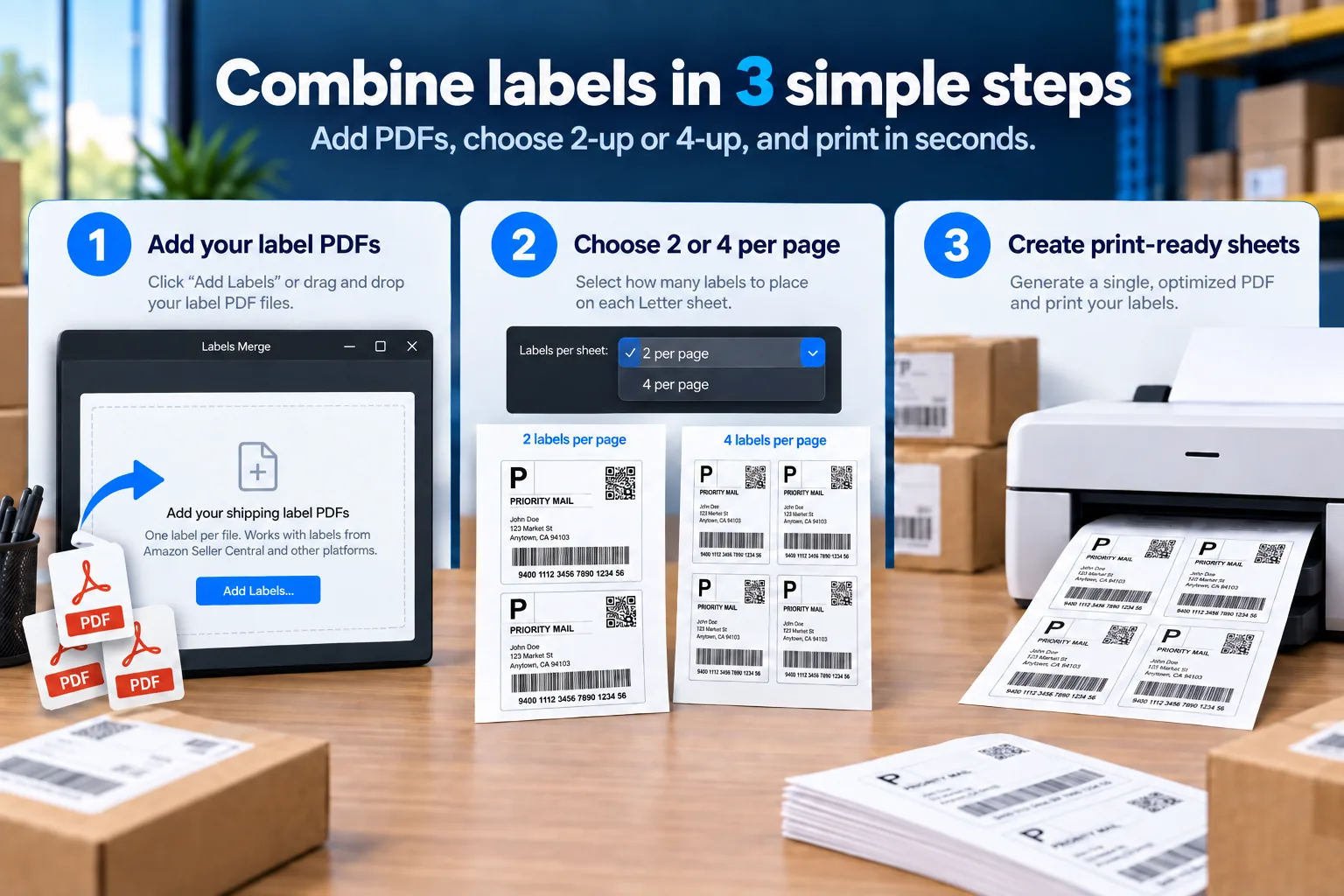
Add your label PDFs, choose 2 or 4 per Letter sheet, and print. Output is a Word file or a PDF, whichever you prefer.
Stop arranging shipping labels by hand.
Drop in your 4×6 label PDFs and turn them into organised, print-ready sheets in seconds. Perfect for FBA restocks, warehouse transfers, e-commerce orders, and bulk fulfilment.
One label per sheet wastes half the page, and labels arranged by hand drift off 4×6 — a slightly undersized barcode can fail to scan after the parcel has gone.
Labels Merge places each label as a fixed shape at absolute page coordinates rather than inside a table, so cell padding and line spacing cannot drift the result off size. Output geometry is measured to 0.01 inch on every build before release.
Built for frequent shippers who are tired of wasting paper and manually arranging labels.
One-time price
US$19
Prices shown in USD. Tax may be added at checkout depending on your country.
Windows 10 and 11. Download and licence key arrive by email straight after checkout.
Buy Labels MergeWhat a sheet looks like
Two labels per sheet, each at full size, with a gap between them so they are easy to cut apart. The measurements below are what the output is checked against on every build.
How it works
- 1Add your label PDFsOne 4x6 label per file. Labels sitting on a larger page are cropped automatically from their ink outline, so nothing is ever cut off.
- 2Pick and order themChoose labels from a thumbnail grid. Labels added one at a time print in the order you click them; adding a whole folder prints them A to Z by filename.
- 3Create the sheetOutput a Word .docx, a PDF, or both. Two labels are placed side by side on a US Letter landscape page at exactly 4.00 x 6.00 inches.
- 4Print at actual sizePrint at 100 percent with page scaling turned off, then check one label with a ruler. This step is in the guide and matters more than any setting in the app.
The full walkthrough — activation, layouts and print settings — is in the Labels Merge guide.
What is included
- One-time purchase of US$19 - no subscription, no renewal
- Lifetime licence for the current version
- Two activations, reissued free by email if you run out
- Word (.docx) and PDF output
- 7-day refund, no questions asked
- Email support direct from the developer
What you need
- Windows 10 or Windows 11, 64-bit
- Microsoft Word to open the .docx output - the PDF output needs no Word
- About 32 MB download, a single .exe, no installer and no Python
- No internet connection required to use the tool
Things worth knowing before you buy
We would rather say these here than have you find them out after paying.
- Your printer can quietly shrink the page. Most printers default to fitting a page inside their printable area, which prints labels slightly under size. A shrunk label looks fine and can still fail a scan. Print at actual size and check the first sheet with a ruler. The guide covers this.
- Windows will warn you on first run. The program is not yet code-signed, so Windows SmartScreen shows a warning the first time you open it. The guide explains how to get past it. A signing certificate is planned once sales support the annual cost.
- The licence is tied to your computer. You get two activations. If you reinstall Windows or change machines beyond that, email support and we will reissue it at no charge.
- There is no free trial yet. Instead there is a 7-day refund with no questions asked. If it does not do what you expected, ask and you get your money back.
- Windows only for now. macOS and Linux are not supported as a packaged download.
- A four-per-page layout is included but not recommended for barcodes. It reduces labels to about 85 percent, which puts the barcode bars below the width the postal specification prefers. It is off by default and we do not advise using it for parcels that must scan.
Support and policies
Support is by email at support@raqeemly.com, answered by the person who wrote the software.
Refunds are available for 7 days from purchase, with no questions asked. Email the address above and the refund is issued through the payment provider.
Who makes this
Labels Merge is sold by an independent trader registered in Australia under the name Raqeemly. The same business also publishes the Raqeemly document scanner app.
The software is written by us. It is not resold or repackaged from anyone else, and the licence to use it is granted directly by us.